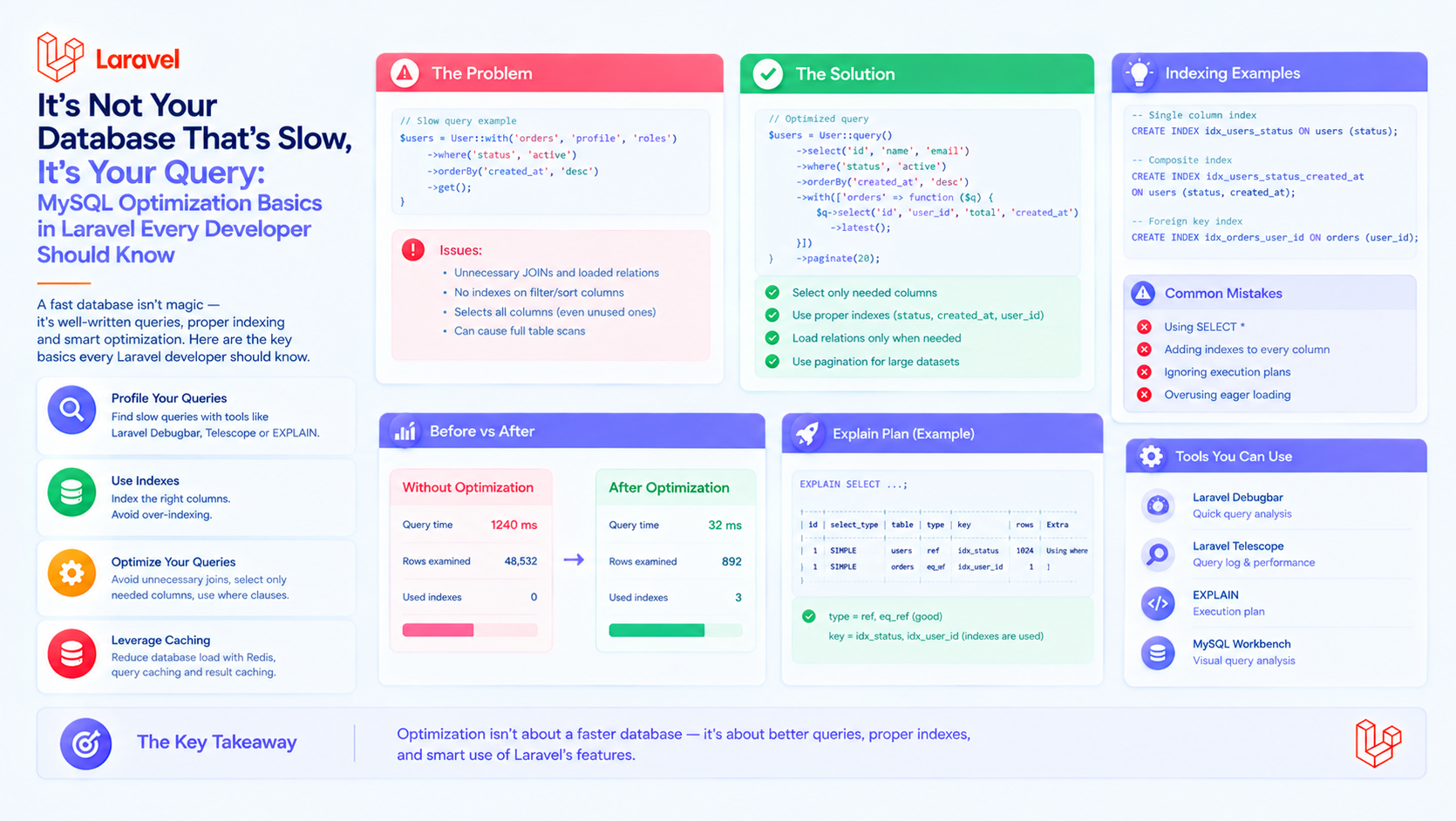
It's Not Your Database That's Slow, It's Your Query: MySQL Optimization Basics in Laravel Every Developer Should Know
Every Laravel developer has been there. A page that used to load in 200ms suddenly takes 3 seconds. Your first instinct is to blame the database: "MySQL is slow," "we need a bigger server," "let's switch to PostgreSQL." But here's the uncomfortable truth — your database is almost never the problem. Your queries are.
MySQL is one of the most battle-tested pieces of software in existence. It can handle millions of rows and thousands of concurrent connections without breaking a sweat. What it can't do is magically fix poorly written queries, missing indexes, and the notorious N+1 problem.
In this article, we'll walk through the essential MySQL optimization techniques every Laravel developer should know — the ones that turn a 3-second page into a 150ms page without upgrading a single piece of hardware.
1. The N+1 Problem: Laravel's Silent Killer
This is the single most common cause of slow Laravel applications, and it's almost always invisible until you look for it.
Consider this innocent-looking code:
Looks fine, right? Except this generates N+1 queries. One query to fetch all posts, then one additional query for each post to fetch its author. With 100 posts, that's 101 queries. With 1,000 posts, that's 1,001 queries.
The fix is eager loading:
Now it's just 2 queries, no matter how many posts you have.
How to Detect N+1 Queries
Laravel has excellent tools for this:
- Laravel Debugbar — shows every query and highlights duplicates.
- Laravel Telescope — a full debugging companion with query profiling.
- DB::listen() — log every query manually.
You can also enable strict mode in development to throw exceptions on lazy loading:
This forces you to catch N+1 issues during development instead of in production.
2. Indexes: The Single Biggest Win
If you only do one thing after reading this article, make it this: add indexes to your foreign keys and frequently queried columns.
Laravel makes this easy with migrations:
A query that scans 1,000,000 rows can drop to scanning 100 with the right index. That's a 10,000x speedup from a single line of code.
How to Know Which Indexes You Need
Use EXPLAIN to see what MySQL is doing:
Look for these warning signs:
- type: ALL — full table scan, no index used.
- rows: 500000 — MySQL expects to scan half a million rows.
- Extra: Using filesort — sorting in memory or on disk instead of using an index.
- Extra: Using temporary — creating a temporary table, usually for GROUP BY.
The fix? Add an index that matches the query pattern — usually the columns in WHERE, then the columns in ORDER BY.
3. Select Only What You Need
Another classic mistake:
If you only need names and emails, say so:
This matters more than you'd think. Fetching large TEXT or JSON columns you don't use can multiply both memory usage and query time. And in Laravel, each Eloquent model has overhead — building hundreds of full models when you only need a few fields is wasteful.
For truly read-only data, consider skipping Eloquent entirely:
Query Builder is significantly faster than Eloquent when you don't need models.
4. Use chunk() and cursor() for Large Datasets
Loading a million rows into memory will crash your application — even if the query itself is fast. Laravel provides two tools for streaming large datasets:
cursor() uses PHP generators and is memory-efficient, but holds a single database connection open for the entire iteration. chunk() executes multiple queries, which is often safer in production.
5. Avoid Queries in Loops
If you find yourself writing this:
Stop. Replace it with a single query:
This applies to updates and deletes too:
The second version is one query instead of hundreds — often the difference between 500ms and 5ms.
6. Be Careful with whereHas and withCount
whereHas() is convenient but can generate expensive correlated subqueries:
For simple existence checks, prefer whereIn with a subquery:
Similarly, withCount() runs a subquery per relationship. It's fine for a couple of relations, but if you're counting five relationships on the same query, consider restructuring.
7. Cache Aggressively
Sometimes the fastest query is the one you don't run at all. Laravel's cache layer is one of the most underused performance tools in the framework.
For data that rarely changes — categories, settings, static lists — caching is essentially free performance. Use Redis or Memcached in production, and remember to invalidate keys when data changes.
8. Analyze Slow Queries in Production
MySQL has a built-in tool for finding slow queries:
After a day in production, review the log. You'll find the real culprits — the queries you'd never guess were slow, running thousands of times a minute.
In Laravel, you can also log slow queries per request using a service provider:
9. Use Proper Data Types
Small details matter more than you'd expect:
- Use
INT UNSIGNEDfor IDs, notVARCHAR. - Use
DECIMALfor money, neverFLOAT. - Use
ENUMorTINYINTfor statuses, notVARCHAR(255). - Use
CHAR(36)for UUIDs, notVARCHAR(255). - Prefer
DATETIMEorTIMESTAMPover string dates.
Smaller columns mean smaller indexes, which mean faster lookups. It adds up.
10. Optimize Relationships and Constraints
Laravel's migrations make it easy to define foreign keys:
Foreign keys not only preserve data integrity — they also create an index automatically, which is often exactly what you need for JOIN performance.
A Practical Debugging Workflow
When a page is slow, follow this sequence:
- Install Laravel Debugbar or Telescope. See how many queries are being run.
- Look for N+1 patterns. Add
with()wherever a relationship is accessed in a loop. - Check the query count. A page should typically run under 20 queries. Over 100 is a red flag.
- Run EXPLAIN on the slowest queries. Look for full table scans.
- Add indexes. Match the index to the columns used in WHERE and ORDER BY.
- Cache what doesn't change. Especially aggregates and configuration data.
- Re-measure. Repeat until the page is fast.
Conclusion
Nine times out of ten, "the database is slow" really means "the queries are slow." Before you reach for a bigger server, a different database engine, or a managed cloud service, spend an afternoon optimizing your queries. You'll almost always find the wins are already there — waiting in the code.
Eager loading, proper indexes, avoiding loops, and caching will solve the majority of performance problems in Laravel applications. None of these techniques require new infrastructure. They require only awareness.
Start with your slowest page. Run a query log. Fix the N+1. Add a missing index. Measure again. Then repeat — and watch your database magically "get faster" without changing a thing about it.